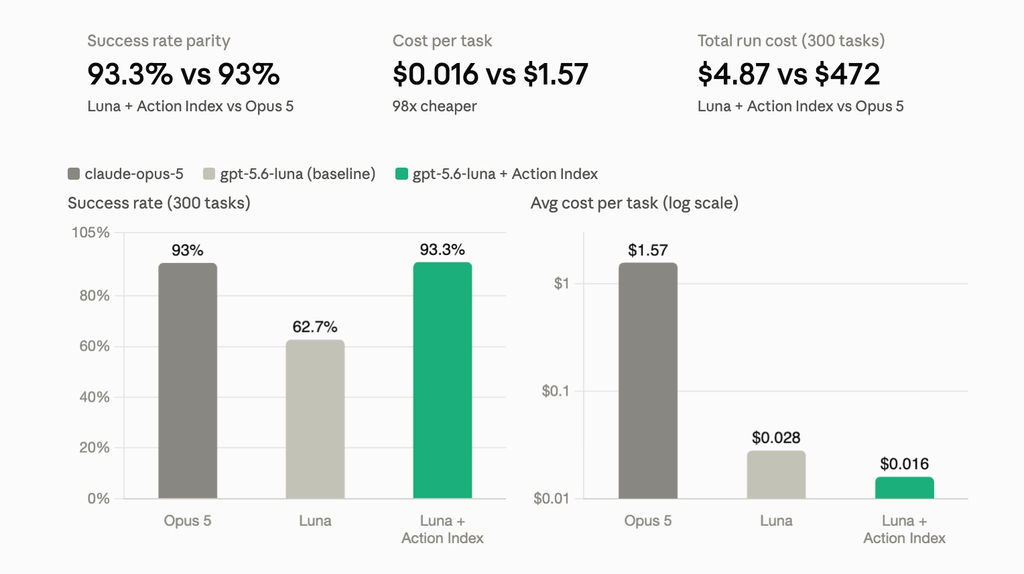
Playwright shows up in two very different job descriptions. A QA engineer uses it to click through a checkout flow and assert the confirmation page renders correctly. A data engineer uses the same API to pull product prices off a thousand pages a day. Same driver, same CDP connection, same page.goto()—and almost nothing else in common. Treat one workload like the other and you end up with flaky tests or a scraper that falls over the moment a site redesigns its checkout button.
What Testing Actually Optimizes For
A test suite exists to answer one question repeatedly: did this specific build break this specific flow? That means:
- Determinism. The same test should pass or fail the same way every run. Flakiness isn't a minor annoyance in testing—it's the thing that erodes trust in the whole suite.
- Known DOM structure. Assertions target selectors you control, because you own the page. When a locator breaks, it's usually because the app changed, and that's a legitimate signal to fix.
- Short-lived, isolated sessions. Each run spins up a clean browser context, executes in seconds, and tears down. CI runners parallelize across browser engines (Chromium, Firefox, WebKit) rather than across geography or identity.
What Scraping Actually Optimizes For
A scraper is answering a different question: what does this page—which you don't control and which can change without notice—actually contain right now? That shifts the requirements almost entirely:
- Resilience over precision. A selector that breaks on a minor CSS change is a liability, not a bug report. Schema-first extraction ("give me the price and title") survives layout changes that would fail a brittle
.querySelectorchain. - Sessions that outlive a single script run. Pagination, infinite scroll, and multi-step flows can mean a browser stays open for minutes or hours, not seconds, and needs to reconnect cleanly if a step fails partway through.
- Infrastructure the site doesn't control. Legitimate scraping at scale often needs geo-appropriate proxying and enough parallel sessions to cover a catalog before the data goes stale—concerns a local Playwright install on a laptop was never built to handle.
Same Library, Different Infrastructure
This is why "just use Playwright" is true and also incomplete. The automation API is shared; the infrastructure underneath it isn't. A test runner wants ephemeral, disposable browsers close to your CI pipeline. A scraper or agent wants managed cloud sessions it can keep alive, reconnect to, and run in parallel at volume:
import os
from anchorbrowser import Anchorbrowser
from playwright.sync_api import sync_playwright

anchor_client = Anchorbrowser(api_key=os.getenv("ANCHOR_API_KEY"))
session = anchor_client.sessions.create()

with sync_playwright() as p:
    browser = p.chromium.connect_over_cdp(session.data.cdp_url)
    page = browser.new_page()
    page.goto("https://example.com/products")
    page.wait_for_selector(".product-card")
The connection is standard CDP, so the code looks like any Playwright script. What's different is what's backing it: a cloud browser session designed to persist across a long extraction run, rather than a local process meant to die at the end of a test. When the goal is structured data rather than pass/fail assertions, Anchor's agent tasks skip the selector entirely and extract against a schema instead:
from pydantic import BaseModel

class Product(BaseModel):
    name: str
    price: str

result = anchor_client.agent.task(
    "Extract the product name and price from this page",
    task_options={
        "output_schema": Product.model_json_schema(),
        "url": "https://example.com/products/123"
    }
)
Neither approach is more "advanced" than the other—they're built for different failure modes. A test should fail loudly the moment your app regresses. A scraper should keep working the moment a target site's markup shifts under it. Trying to make one tool serve both jobs usually means under-serving both.
If the workload you're building is on the scraping and agent side of that line—long-running sessions, schema-first extraction, and infrastructure that scales past a handful of local browser instances—that's what Anchor is built for. Get an API key and point it at a page you'd otherwise be maintaining a brittle scraper for.